Kruti Dev Keyboard Layout: Remington Gail Chart With Every Key
Whether you are preparing for a Hindi typing test or simply want to type faster in Kruti Dev 010, the keyboard layout is the first thing to master. Kruti Dev uses the Remington Gail layout, the same arrangement that Hindi typewriters used for decades.
Below you will find a printable chart, a key by key table, the rules that trip up most beginners, and Alt codes for the characters that have no key at all. We built every row from the same mapping our converter uses, and we tested it against real Kruti Dev text.
Kruti Dev 010 Keyboard Chart
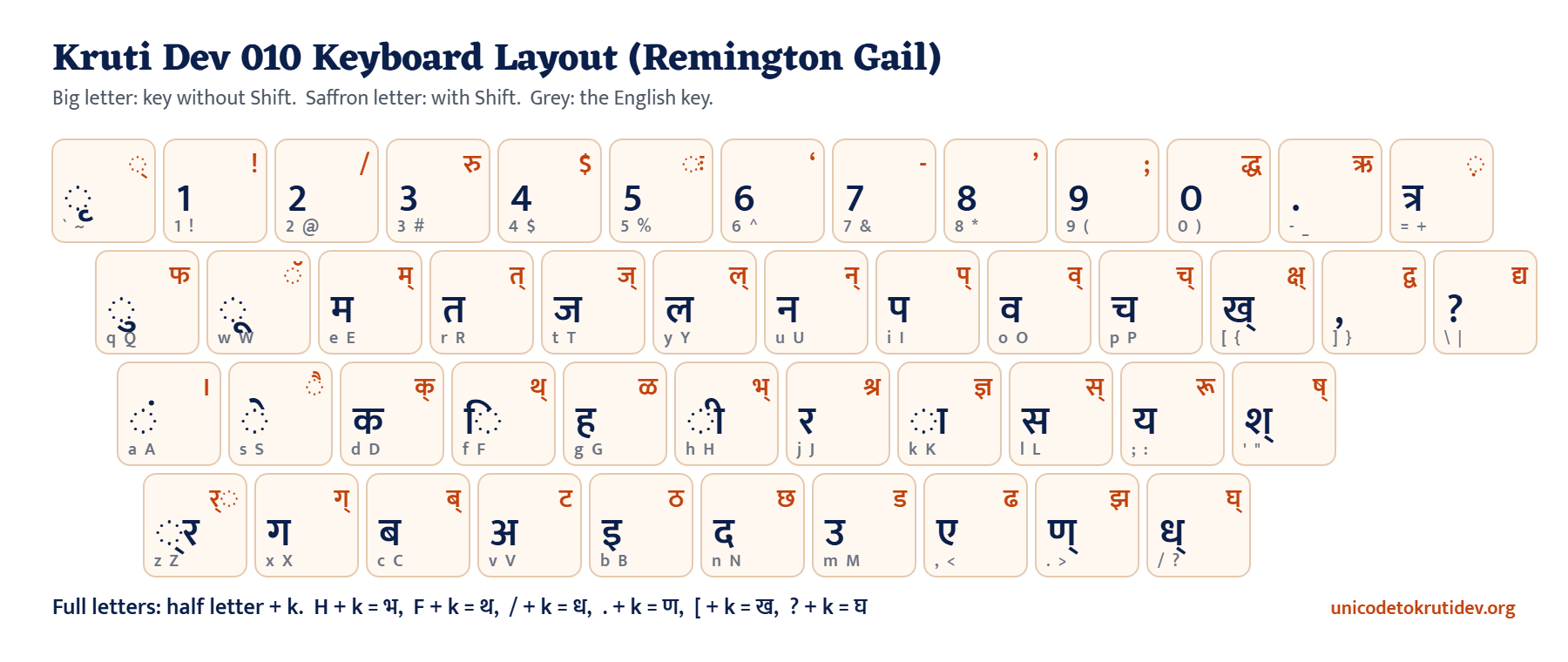
On each key, the big navy letter is what you get without Shift, and the small saffron letter is what you get with Shift. Signs like ि and ा appear on a dotted circle (◌), the standard way to show a sign that attaches to a letter.
Every Key at a Glance
| Key | Types | Shift + key | Types |
|---|---|---|---|
| q | ◌ु | Shift + q | फ |
| w | ◌ू | Shift + w | ◌ॅ |
| e | म | Shift + e | म् (half) |
| r | त | Shift + r | त् (half) |
| t | ज | Shift + t | ज् (half) |
| y | ल | Shift + y | ल् (half) |
| u | न | Shift + u | न् (half) |
| i | प | Shift + i | प् (half) |
| o | व | Shift + o | व् (half) |
| p | च | Shift + p | च् (half) |
| [ | ख् (half) | Shift + [ | क्ष् (half) |
| ] | , (comma) | Shift + ] | द्व |
| \ | ? (question mark) | Shift + \ | द्य |
| a | ◌ं (anusvara) | Shift + a | । (full stop) |
| s | ◌े | Shift + s | ◌ै |
| d | क | Shift + d | क् (half) |
| f | ि (typed before its letter) | Shift + f | थ् (half) |
| g | ह | Shift + g | ळ |
| h | ◌ी | Shift + h | भ् (half) |
| j | र | Shift + j | श्र |
| k | ◌ा | Shift + k | ज्ञ |
| l | स | Shift + l | स् (half) |
| ; | य | Shift + ; | रू |
| ‘ | श् (half) | Shift + ‘ | ष् (half) |
| z | ◌्र (र below) | Shift + z | र् on top (reph, typed after its letter) |
| x | ग | Shift + x | ग् (half) |
| c | ब | Shift + c | ब् (half) |
| v | अ | Shift + v | ट |
| b | इ | Shift + b | ठ |
| n | द | Shift + n | छ |
| m | उ | Shift + m | ड |
| , | ए | Shift + , | ढ |
| . | ण् (half) | Shift + . | झ |
| / | ध् (half) | Shift + / | घ् (half) |
| backtick | ◌ृ | Shift + backtick | ◌् (halant) |
| minus key | . (dot) | Shift + minus | ऋ |
| = | त्र | Shift + = | ◌़ (nukta) |
| 3 | 3 | Shift + 3 | रु |
| 5 | 5 | Shift + 5 | ◌ः (visarga) |
| 0 | 0 | Shift + 0 | द्ध |
| 9 | 9 | Shift + 9 | ; (semicolon) |
| 2 | 2 | Shift + 2 | / (slash) |
The other number keys type ordinary English digits, so you need Alt codes for Hindi digits (see below).
Five Rules That Make Kruti Dev Click
1. Half letter plus k makes a full letter
Many full letters have no key of their own. Instead, you type the half letter and then k, which adds the vertical bar. For example:
| You type | You get |
|---|---|
| H then k | भ |
| F then k | थ |
| / then k | ध |
| . then k | ण |
| [ then k | ख |
| ? then k | घ |
| ‘ then k | श |
| ” then k | ष |
So भारत is typed as Hkkjr: H and k make भ, a second k adds ा, then j for र and r for त.
2. Type ि before its letter
In Kruti Dev you type ि where it appears on paper, which is before the consonant. So हिन्दी is fgUnh: f first, then g for ह.
3. Type the reph after its letter
The र् that sits on top of a letter (reph) goes after the syllable, with Shift + z. So धर्म is /keZ and कार्य is dk;Z.
4. Use the conjunct keys
Several common conjuncts have their own keys, which saves keystrokes: = for त्र, K for ज्ञ, J for श्र, {k for क्ष, | for द्य and } for द्व. That is how क्षेत्र becomes {ks=.
5. Use z or the halant for other conjuncts
For र below a letter, as in प्र, add z after the letter: iz. For any other half letter that has no key, add the halant with Shift + backtick, as in पट्टी typed as iV~Vh.
Alt Codes for Hindi Digits and Special Conjuncts
Some characters have no key at all. Hold the Alt key and type the code on the number pad, with Num Lock on.
| Character | Alt code | Character | Alt code |
|---|---|---|---|
| ० | Alt + 0229 | ५ | Alt + 0135 |
| १ | Alt + 0131 | ६ | Alt + 0136 |
| २ | Alt + 0132 | ७ | Alt + 0137 |
| ३ | Alt + 0133 | ८ | Alt + 0138 |
| ४ | Alt + 0134 | ९ | Alt + 0139 |
| क्र | Alt + 0216 | प्र | Alt + 0231 |
| द्र | Alt + 0230 | फ्र | Alt + 0221 |
| क्त | Alt + 0228 | न्न | Alt + 0233 |
| ह्न | Alt + 0224 | ह्म | Alt + 0227 |
| ह्य | Alt + 0225 | हृ | Alt + 0226 |
| कृ | Alt + 0209 | ऊ | Alt + 0197 |
| ँ (chandrabindu) | Alt + 0161 | ऽ (avagraha) | Alt + 0183 |
Alt codes need the Kruti Dev 010 font active, and they work on Windows with a number pad. On a laptop without one, use the On Screen Keyboard or our converter instead.
Practice Tips From Typing Learners
- Learn the home row first. The keys under your fingers (a s d f and j k l 😉 give ं े क ि and र ा स य, some of the most frequent signs in Hindi.
- Drill the half plus k pattern. Once H k, F k and / k feel natural, a big part of the keyboard falls into place.
- Check your own typing. Type a passage in Kruti Dev, paste it into our Kruti Dev to Unicode converter, and read the result. Any wrong key shows up instantly as a wrong letter.
- Turn off smart quotes in MS Word. Word changes ‘ and ” into curly quotes, which breaks श and ष. Go to File, Options, Proofing, AutoCorrect Options, AutoFormat As You Type, and untick the smart quotes option.
- Confirm your exam rules. Typing tests differ in font, layout and time. Always read the official notification for your recruitment.
Frequently Asked Questions
Is Kruti Dev the same as the Remington Gail keyboard?
Kruti Dev 010 is a font, and Remington Gail is the key layout it follows. Together they give the classic typewriter style of Hindi typing.
Can I type Kruti Dev without installing the font?
No. Kruti Dev text needs the Kruti Dev 010 font to look like Hindi. See our guide on installing the Kruti Dev 010 font.
How do I type a question mark in Kruti Dev?
Press the backslash key (\). The ? key itself types the half letter घ्.
How do I type Hindi numbers in Kruti Dev?
Use Alt codes: Alt + 0229 for ० and Alt + 0131 to 0139 for १ to ९, as listed above.
Can I type Unicode Hindi with this same layout?
If you are choosing between legacy Kruti Dev typing and Unicode Remington GAIL, see how Kruti Dev differs from Unicode Hindi.
Yes. Input tools such as Hindi Indic Input 3 offer a Remington Gail layout for Unicode. Or type in Kruti Dev and convert with our Kruti Dev to Unicode converter.